Technology In the Kimberly Middle/ Elementary school and how technology has changed in the classroom since I was in elementary school
Technology in Kimberly middle/ Elementary school
Going into Kimberley’s Middle School was a wonderful experience. Our digital literacy class got to work with a grade five class in making stop motion.
For the stop motion assignment, we had the option to use the class iPads with the app Zing, or we could use our personal cell phones with the Stop Motion app. Our task as teachers in training was to encourage our small group of students to come up with a simple yet engaging stop motion story. My group decided it was most beneficial for us to use the cell phone with the Stop Motion app.
Why did we choose the cell phone and the Stop Motion app? We chose the cell phone as it was easier for the kids to hold. The stop motion movie was taking place on a high window ledge, so we had to be mindful of how long the student would have to hold the filming device. Normally when doing stop motion, having the device on a stabilized surface (like a floor or a tripod) is recommended so the frame doesn’t move. Our group had to adjust and adapt to the idea that holding it by hand was going to be the best way to capture our scenes.
For a very first stop-motion project with Grade 5s, the movie turned out quite well. You can tell we didn’t use a stabilizer for the iPhone because the frame shakes, but that is all a part of the learning process. There are also a few scenes where a person’s hand or body appears in the shot, which serves as a great reminder for students to pause and check the frame before taking each photo. Finally, the added sound effects truly brought the short clip to life, allowing the students to put their own personal touch on the movie.
Why Stop Motion projects work for a class
Stop motion projects work for a class setting because it fosters at least eight different important aspects of what learning looks like among the mind set, these eight things are.

- Patience
- Team work/ sharing
- collaboration
- Pride
- creativity
- Accountability
- listening
- contributing
- Along with these dispositions of mind set, it also allows the instructor to take the time to talk about why sound is so import? Why the angle is taken the way it is?
- How detail is so important with in a story to make a clear story line. This can be connected to English class as it’s the process of developing a story, but just done in a different way.
When all of the groups were finished making their stop motion projects, it was time to show the whole class all of the wonderful projects that had been created.
The grade five instructor seemed to be in a constant “fight” with technology. But she progressed on and kept finding new ways to pivot around the issues
- Her main form of showing off these movies was from a computer to a projector, unfortunately her computer stopped having direct connection to the projector.
- So she pivoted and used her Document camera to project off of her iPad, then the iPad started having issues having connection to the projector as well.
- So she pivoted for the third, this time she used her iPhone to project the last short movie
While she worked to troubleshoot, her document camera repeatedly disconnected from the projector, shutting down and restarting every few minutes. Throughout all this technology drama, both the Grade 5 teacher and her students remained remarkably calm and patient, and we were eventually able to view all of the short films.
The change from 2009 technology in the classroom to 2026 technology in the classroom
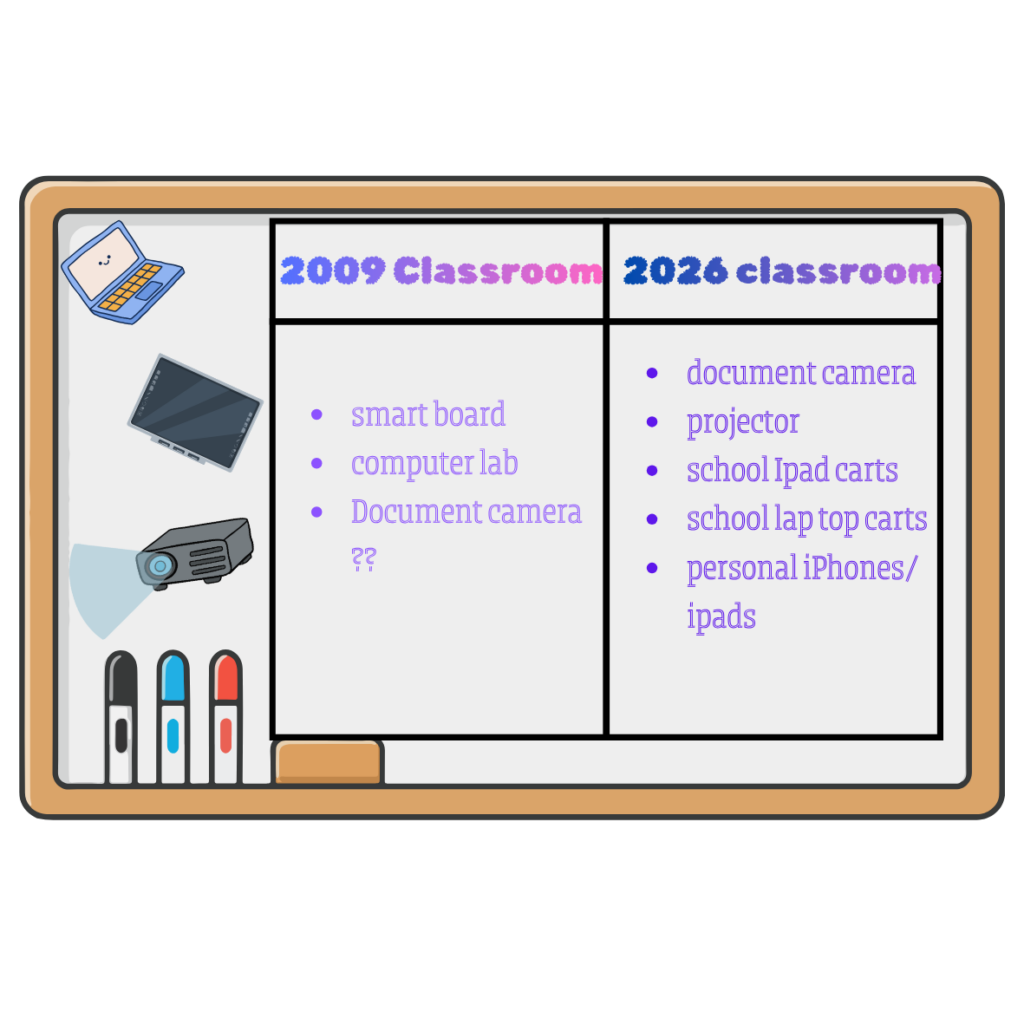
Now this list is only based off of the one grade five class I saw and my first couple of years in elementary school
– Made in Canva
I would say the biggest difference is that in this classroom there was only a projector, whereas throughout my own education there was always a SMART Board. To me, this felt like a step backward in technology. SMART Boards offer the benefit of allowing students and teachers to write on them and interact with digital content for the whole class to see, while a standard projector only displays an image. (Although I have heard that SMART Boards are becoming somewhat outdated, which might explain why this particular classroom didn’t have one.)
Another major difference was the move from traditional computer labs to iPad or laptop carts. Sometime during my own schooling, laptop carts were introduced, but we never had iPads. For the most part, we would visit a designated computer lab whenever our teachers booked it. Now, iPads and computers are available right where you need them.
Overall, I didn’t notice a massive change in the physical classrooms themselves, but I did notice how much more accessible technology has become. This accessibility opens up so many new resources and project possibilities for students.
All of the clip art and images were made by sahrysha in Canva
Leave a Reply
You must be logged in to post a comment.